



-
Original price was: $699.99.$459.99Current price is: $459.99.
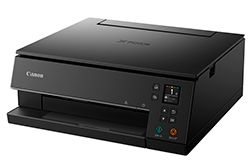
Get this Canon MAXIFY printer to help your business keep pace with your workload. This Canon all-in-one printer is your trusty ally for scanning, copying, and faxing your everyday tasks. What’s more, this wireless printer syncs with various mobile printing options, avoiding the need to hunt for cords to get started.
Key Features:
– Print at speeds of up to 24 pages per minute in black and up to 15.5 pages per minute in color.
– Produce high-quality prints with a resolution of up to 600 x 1200 dpi.
– Enjoy the convenience of mobile printing options, including AirPrint, Mopria Print Service, Canon PRINT app, Easy PhotoPrint Editor App, Canon Printer Service (Android), PIXMA Cloud Link, and the Creative Park App.
– Achieve voice-activated operation with compatibility for Amazon Alexa and Google Assistant.
– Swiftly copy legal- and letter-size documents in approximately 12 seconds (color).
– Copy features include Frame Erase Copy, Fit-to-Page, Reduction/Zoom Copy, and more.
– The flatbed/ADF scanner scans at a rate of 22.2 items per minute (ipm) in black and 12.2 ipm in color with a sharp 1200 x 1200 dpi optical resolution.
– Scan features include Multi-Page PDF, Unsharp mask, Rotate, and more.
– The fax offers a resolution of 300 x 300 dpi and has a memory capacity of up to 250 pages.
– Fax features include Double-sided printing, FAX to Folder, and more.
– Stay updated with the 2.7″ LCD screen that provides you with a clear view of the current jobs. -
Original price was: $249.99.$179.99Current price is: $179.99.
-
Original price was: $329.99.$199.99Current price is: $199.99.
The Canon MAXIFY MB5120 inkjet multifunction printer is designed to handle your printing needs. With a capacity to hold up to 250 sheets at once, it’s perfect for those large printing jobs. Whether you prefer wireless printing or connecting through USB, this printer offers color printing on plain paper. Key Features:
– Always ready to print in as little as 6 seconds from power on with Quick First Print.
– Designed to tackle the big jobs with a spacious 250 Sheet Paper Capacity.
– The MAXIFY MB5120 delivers a high page yield, helping you save money by providing a large volume of prints from one set of ink tanks. -
Original price was: $99.99.$69.99Current price is: $69.99.
Choose the Canon All-in-One Inkjet Printer to meet your essential printing needs. This wireless inkjet printer offers a range of features, ensuring your work gets done efficiently. **Printing:** With a speed of up to 8.8 pages per minute in black and 4.4 pages per minute in color, you’ll be able to complete your tasks without delay. Achieve a crisp resolution of 4800 x 1200 dpi for excellent print quality. **Versatile Printing:** Enjoy 4″ x 6″ borderless photo printing and the convenience of auto duplex printing for special tasks. **Mobile Printing:** The printer offers multiple mobile printing options, including Canon Print Service for Android, AirPrint, Mopria® Print Service, PIXMA/MAXIFY Cloud Link, and Wireless Printing, giving you the flexibility to print from your preferred device. **Efficient Copying:** Copy documents at speeds of up to 8.8 copies per minute in black and 4.4 copies per minute in color. The printer features various copy functions such as Borderless Copy, Collated Copy, and Fit-to-Page, enhancing your document handling. **Scanning Convenience:** The flatbed scanner uses a Contact Image Sensor (CIS) and an Auto Document Feeder (ADF) to scan legal- and letter-size documents at 600 x 1200 dpi.


-
Original price was: $699.99.$459.99Current price is: $459.99.
Get this Canon MAXIFY printer to help your business keep pace with your workload. This Canon all-in-one printer is your trusty ally for scanning, copying, and faxing your everyday tasks. What’s more, this wireless printer syncs with various mobile printing options, avoiding the need to hunt for cords to get started.
Key Features:
– Print at speeds of up to 24 pages per minute in black and up to 15.5 pages per minute in color.
– Produce high-quality prints with a resolution of up to 600 x 1200 dpi.
– Enjoy the convenience of mobile printing options, including AirPrint, Mopria Print Service, Canon PRINT app, Easy PhotoPrint Editor App, Canon Printer Service (Android), PIXMA Cloud Link, and the Creative Park App.
– Achieve voice-activated operation with compatibility for Amazon Alexa and Google Assistant.
– Swiftly copy legal- and letter-size documents in approximately 12 seconds (color).
– Copy features include Frame Erase Copy, Fit-to-Page, Reduction/Zoom Copy, and more.
– The flatbed/ADF scanner scans at a rate of 22.2 items per minute (ipm) in black and 12.2 ipm in color with a sharp 1200 x 1200 dpi optical resolution.
– Scan features include Multi-Page PDF, Unsharp mask, Rotate, and more.
– The fax offers a resolution of 300 x 300 dpi and has a memory capacity of up to 250 pages.
– Fax features include Double-sided printing, FAX to Folder, and more.
– Stay updated with the 2.7″ LCD screen that provides you with a clear view of the current jobs. -
Original price was: $249.99.$179.99Current price is: $179.99.
-
Original price was: $329.99.$199.99Current price is: $199.99.
The Canon MAXIFY MB5120 inkjet multifunction printer is designed to handle your printing needs. With a capacity to hold up to 250 sheets at once, it’s perfect for those large printing jobs. Whether you prefer wireless printing or connecting through USB, this printer offers color printing on plain paper. Key Features:
– Always ready to print in as little as 6 seconds from power on with Quick First Print.
– Designed to tackle the big jobs with a spacious 250 Sheet Paper Capacity.
– The MAXIFY MB5120 delivers a high page yield, helping you save money by providing a large volume of prints from one set of ink tanks. -
Original price was: $99.99.$69.99Current price is: $69.99.
Choose the Canon All-in-One Inkjet Printer to meet your essential printing needs. This wireless inkjet printer offers a range of features, ensuring your work gets done efficiently. **Printing:** With a speed of up to 8.8 pages per minute in black and 4.4 pages per minute in color, you’ll be able to complete your tasks without delay. Achieve a crisp resolution of 4800 x 1200 dpi for excellent print quality. **Versatile Printing:** Enjoy 4″ x 6″ borderless photo printing and the convenience of auto duplex printing for special tasks. **Mobile Printing:** The printer offers multiple mobile printing options, including Canon Print Service for Android, AirPrint, Mopria® Print Service, PIXMA/MAXIFY Cloud Link, and Wireless Printing, giving you the flexibility to print from your preferred device. **Efficient Copying:** Copy documents at speeds of up to 8.8 copies per minute in black and 4.4 copies per minute in color. The printer features various copy functions such as Borderless Copy, Collated Copy, and Fit-to-Page, enhancing your document handling. **Scanning Convenience:** The flatbed scanner uses a Contact Image Sensor (CIS) and an Auto Document Feeder (ADF) to scan legal- and letter-size documents at 600 x 1200 dpi.

Great title! Here’s a structured outline for “The Ultimate Guide to Digital Marketing in 2025”,...

Absolutely — Google Business Profile (GBP) is still one of the most powerful and underutilized tools...

Creating a content marketing strategy that actually works in 2025 is all about clarity, consistency,...